What you will achieve
By the end of this quickstart you will have:
- a configured Partner profile in the Wych portal
- a registered Application (purpose, consent copy, redirect URLs)
- the ability to start a customer connection
- a working pattern to retrieve customer data via Wych APIs
In Wych’s model, the data provider (for example a bank) sends responses to Wych first. Your application retrieves the resulting data from Wych APIs.
Prerequisites
- access to the Wych partner portal
- an agreed environment (sandbox / non-production / production)
- an application domain for redirects (or a temporary URL for testing)
Step 1: Create and configure your Partner
- Sign in to the partner portal.
- Create your Partner profile (business details).
- Configure branding (name, logo, colours) if you are using a hosted consent journey.
- Confirm your environment configuration (non-production and production as applicable).
Next: follow the detailed guide in Guides → Configure your partner.
Step 2: Register your Application
In the portal, register an Application. This is where you define:
- what your application does (purpose and use case)
- the customer journey type (hosted by Wych or embedded into your app)
- consent copy shown to customers
- redirect / callback URLs
Next: follow the detailed guide in Guides → Register your application.
Step 3: Authenticate to Wych APIs
Wych APIs require your application to authenticate. This typically involves:
- an API key (to identify the calling application)
- an access token (to authorise calls)
Next: follow Guides → Authenticate.
Step 4: Start a customer connection
Choose your connection approach:
- Hosted consent journey (recommended)
- Bring your own journey (advanced)
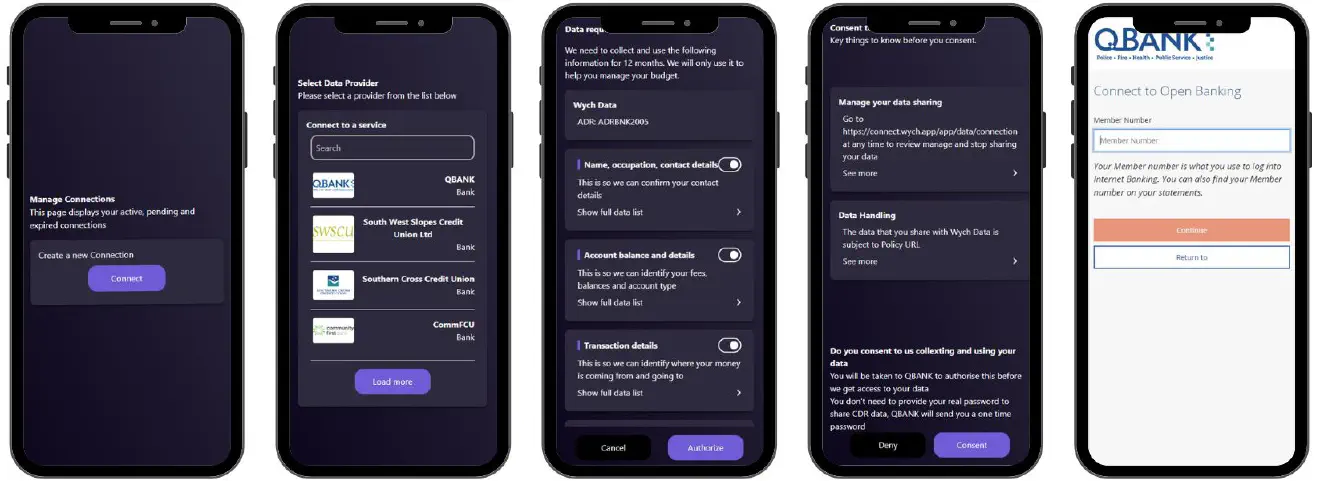
You send the customer to a Wych hosted flow, branded for your organisation. The customer selects their data provider, reviews consent, and authenticates directly with the provider.
When to use: fastest implementation, least compliance and UI effort.
Next: follow Guides → Consent → Hosted consent journey.
You build the customer experience in your application and use Wych APIs to create and manage the connection.
When to use: you need full UI control and can support the additional implementation and assurance requirements.
Next: follow Guides → Consent → Embedded consent journey.
Example hosted journey:
Step 5: Retrieve customer data
Once the connection is active, your application retrieves the customer’s data from Wych APIs using a customer context token.
Typical sequence:
- Call accounts to get account identifiers
- Call balances for current and available balances
- Call transactions to retrieve transaction history
Next: follow Guides → Retrieve data.
Where to go next
- Concepts:
- Partner, Application, Customer, Connection, Data Provider
- Guides:
- Configure your partner
- Register your application
- Authenticate
- Consent (hosted or embedded)
- Retrieve data